Screamer Radio 0.4.4
Updated on 09 Dec 2011
By Anthony Buckner
By Anthony Buckner
Specifications
License:
Updated:
Downloads:
7095
Platform:
Windows All
Publisher:
David Zidar(more)
Website:
User Reviews:
Other versions:
0.3.8
Do you like
Screamer Radio?
Screamer Radio?
FindMySoft Editor's Review
Screamer Radio - An radio player, that will stream audio data to your PC
The history of radio goes way back before you were born, and with the spread of the Internet it seems like it has been reborn. That's because the Internet is a great method of streaming and radios can definitely benefit from this. Listening to radio stations over the web offers the user the advantage of quick-jumping from one station to another, just like in the digital radio players. A software that allows listening to radio stations worldwide is Scream Radio. The program includes many radio streams, organized in various ways, plus a recording feature, which converts the sound directly to MP3 files.
Installing the program is a simple and quick task and there's also a portable version, that can be run from any USB memory device. The system requirements are extremely low and all that's required is a typical soundcard and a set of speakers or headphones. Every version of Microsoft Windows can be used for running the application.
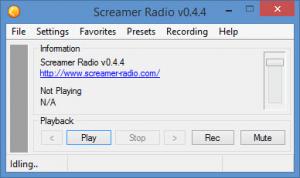
Running the software displays a simple and neat interface with intuitive menu commands, that can be used without problems even by beginners. The features of Screamer Radio are not visible at a first glance of the interface. The Menu bar hides much more features designed to make radio listening as pleasurable as possible. After navigating through the menu for a while, the user will soon realize that the number of radio stations available is overwhelming and it's much larger than the number of streams offered by other similar programs. The stations are organized in various ways, for quickly finding a desired one. Thus, the user can look for a station by a certain location, category or network.
All the program's functions and options can also be handled using the icon in the system tray, this being useful for not cluttering the desktop.
After selecting a desired radio station, the user is presented with some information about the stream, like the name of it the web site, the current played song and the bit rate of the station. The bit rate of the radio streams offered by Screamer Radio is generally good enough for an average user.
Recording is one of the features in Screamer Radio that you cannot find in many other such programs. The best part is that it can encode the sound directly into the MP3 format. All you have to do is press the Rec button to start the process, and then again to stop it. Radio stations can be added to Favorites, for easy finding them in the future. A station can have more than one stream, so if one doesn't work the application will move to playing the next one.
The preferences menu of Screamer Radio includes many options for customizing the functionality and the appearance of the program. Thus, the software can be set to run when Windows starts and also, the bit rate of the encoded MP3 file can be chosen.
Pros:
It includes an enormous station list, that covers everybody's music taste. Also, the recording option supports more streams at the same time. Besides that, the icon in system tray can be used for controlling all the application's options.
Cons:
The interface of the software is a bit too simple. Also, the list of radio stations cannot be modified and the Favourites section does not offer an easy way to organize the user's preferences in groups.
Screamer Radio is a great program that allows listening to every radio station worldwide from the comfort of your PC.
Installing the program is a simple and quick task and there's also a portable version, that can be run from any USB memory device. The system requirements are extremely low and all that's required is a typical soundcard and a set of speakers or headphones. Every version of Microsoft Windows can be used for running the application.
Running the software displays a simple and neat interface with intuitive menu commands, that can be used without problems even by beginners. The features of Screamer Radio are not visible at a first glance of the interface. The Menu bar hides much more features designed to make radio listening as pleasurable as possible. After navigating through the menu for a while, the user will soon realize that the number of radio stations available is overwhelming and it's much larger than the number of streams offered by other similar programs. The stations are organized in various ways, for quickly finding a desired one. Thus, the user can look for a station by a certain location, category or network.
All the program's functions and options can also be handled using the icon in the system tray, this being useful for not cluttering the desktop.
After selecting a desired radio station, the user is presented with some information about the stream, like the name of it the web site, the current played song and the bit rate of the station. The bit rate of the radio streams offered by Screamer Radio is generally good enough for an average user.
Recording is one of the features in Screamer Radio that you cannot find in many other such programs. The best part is that it can encode the sound directly into the MP3 format. All you have to do is press the Rec button to start the process, and then again to stop it. Radio stations can be added to Favorites, for easy finding them in the future. A station can have more than one stream, so if one doesn't work the application will move to playing the next one.
The preferences menu of Screamer Radio includes many options for customizing the functionality and the appearance of the program. Thus, the software can be set to run when Windows starts and also, the bit rate of the encoded MP3 file can be chosen.
Pros:
It includes an enormous station list, that covers everybody's music taste. Also, the recording option supports more streams at the same time. Besides that, the icon in system tray can be used for controlling all the application's options.
Cons:
The interface of the software is a bit too simple. Also, the list of radio stations cannot be modified and the Favourites section does not offer an easy way to organize the user's preferences in groups.
Screamer Radio is a great program that allows listening to every radio station worldwide from the comfort of your PC.
Do you like Screamer Radio
Quick Look VideoNew
Popular News
The MATE and Cinnamon editions of Linux Mint 13 Release Candidate have been rolled to the public.
Tell Drinkify what you're listening to and it will tell you what drink to get.
Screamer Radio Awards
Screamer Radio Editor's Review Rating
Screamer Radio has been reviewed by Jerome Johnston on
12 Dec 2011. Based on the user interface, features and complexity, Findmysoft has rated
Screamer Radio
5
out of 5 stars, naming it EssentialYour Rating
Top Downloads
2.
Opera5.
Trillian8.
AIM9.
Skype10.
Ad-Aware12.
Nero13.
Google Earth14.
Picasa15.
Winamp16.
iTunes17.
RealPlayer18.
uTorrent19.
eMule20.
WinRAR21.
BitComet22.
WinZip23.
Shareaza24.
CCleaner25.
Recuva26.
Tweak UI27.
CuteFTP Home29.
Adobe Reader30.
NewsPiperBecome A Fan!
Link To Us!
Screamer Radio
HTML Linking Code
HTML Linking Code
Latest Reviews